ABN : 97 371 291 722
Phone : 07 5641 6004
Mobile : 0455 242 321
We are System Administrators that specialise in open-source software solutions.
Open Source Software: Key Concepts and Benefits (3 Minutes)
Hashtags:
#OpenSourceSoftware #TechInnovation #SoftwareDevelopment #Collaboration #FreeSoftware #OpenSourceCommunity #Technology #SoftwareEngineering #DigitalTransformation #Coding
SEO Tags:
Open Source Software Overview, Understanding Open Source, The Importance of Open Source in Technology, The Future of Software Development, The Connection Between Open Source and Innovation, The Role of Open Source in Collaboration, The Benefits of Using Open Source Software, The Connection Between Open Source and Community Development, The Role of Open Source in Education, The Importance of Transparency in Software Development, The Connection Between Open Source and Security, The Role of Open Source in Business, The Importance of Licensing in Open Source, The Connection Between Open Source and Customization, The Role of Open Source in Government, The Importance of User Contributions in Open Source, The Connection Between Open Source and Global Collaboration, The Role of Open Source in Emerging Technologies, The Importance of Research in Open Source Projects, The Connection Between Open Source and Software Quality, The Role of Open Source in Nonprofits, The Importance of Documentation in Open Source, The Connection Between Open Source and User Experience, The Role of Open Source in Mobile Applications, The Importance of Community Support in Open Source, The Connection Between Open Source and Future Technologies, The Role of Open Source in Cloud Computing, The Importance of Diversity in Open Source Communities, The Connection Between Open Source and Digital Rights, The Role of Open Source in Environmental Sustainability, The Importance of Ethics in Open Source Development, The Connection Between Open Source and Global ConnectivityShow More

Now Playing
Open Source Software: Key Concepts and Benefits (3 Minutes)
The Ultimate Guide to Open Source Software: Key Concepts and Benefits ...
The Ultimate Guide to Open Source Software: Key Concepts and Benefits explores the transformative world of open source software and its impact on technology and innovation. In this video, we ...delve into the principles of open source, including collaboration, transparency, and community-driven development. You'll learn about the benefits of using open source software, such as cost savings, flexibility, and security. Join us as we share expert insights, real-world examples, and the challenges and opportunities that come with adopting open source solutions. Don't miss this opportunity to understand how open source software is shaping the future of technology!
Hashtags:
#OpenSourceSoftware #TechInnovation #SoftwareDevelopment #Collaboration #FreeSoftware #OpenSourceCommunity #Technology #SoftwareEngineering #DigitalTransformation #Coding
SEO Tags:
Open Source Software Overview, Understanding Open Source, The Importance of Open Source in Technology, The Future of Software Development, The Connection Between Open Source and Innovation, The Role of Open Source in Collaboration, The Benefits of Using Open Source Software, The Connection Between Open Source and Community Development, The Role of Open Source in Education, The Importance of Transparency in Software Development, The Connection Between Open Source and Security, The Role of Open Source in Business, The Importance of Licensing in Open Source, The Connection Between Open Source and Customization, The Role of Open Source in Government, The Importance of User Contributions in Open Source, The Connection Between Open Source and Global Collaboration, The Role of Open Source in Emerging Technologies, The Importance of Research in Open Source Projects, The Connection Between Open Source and Software Quality, The Role of Open Source in Nonprofits, The Importance of Documentation in Open Source, The Connection Between Open Source and User Experience, The Role of Open Source in Mobile Applications, The Importance of Community Support in Open Source, The Connection Between Open Source and Future Technologies, The Role of Open Source in Cloud Computing, The Importance of Diversity in Open Source Communities, The Connection Between Open Source and Digital Rights, The Role of Open Source in Environmental Sustainability, The Importance of Ethics in Open Source Development, The Connection Between Open Source and Global ConnectivityShow More
Hashtags:
#OpenSourceSoftware #TechInnovation #SoftwareDevelopment #Collaboration #FreeSoftware #OpenSourceCommunity #Technology #SoftwareEngineering #DigitalTransformation #Coding
SEO Tags:
Open Source Software Overview, Understanding Open Source, The Importance of Open Source in Technology, The Future of Software Development, The Connection Between Open Source and Innovation, The Role of Open Source in Collaboration, The Benefits of Using Open Source Software, The Connection Between Open Source and Community Development, The Role of Open Source in Education, The Importance of Transparency in Software Development, The Connection Between Open Source and Security, The Role of Open Source in Business, The Importance of Licensing in Open Source, The Connection Between Open Source and Customization, The Role of Open Source in Government, The Importance of User Contributions in Open Source, The Connection Between Open Source and Global Collaboration, The Role of Open Source in Emerging Technologies, The Importance of Research in Open Source Projects, The Connection Between Open Source and Software Quality, The Role of Open Source in Nonprofits, The Importance of Documentation in Open Source, The Connection Between Open Source and User Experience, The Role of Open Source in Mobile Applications, The Importance of Community Support in Open Source, The Connection Between Open Source and Future Technologies, The Role of Open Source in Cloud Computing, The Importance of Diversity in Open Source Communities, The Connection Between Open Source and Digital Rights, The Role of Open Source in Environmental Sustainability, The Importance of Ethics in Open Source Development, The Connection Between Open Source and Global ConnectivityShow More

Now Playing
What Open Source AI Really Means: Transparency, Freedom, & Impact
Learn more about Five Open-Source AI tools to know here → ...
Learn more about Five Open-Source AI tools to know here → https://ibm.biz/BdnJ62
What does open source AI really mean? 🤔 Cedric Clyburn breaks down the essentials of transparency, licensing, and data ...openness in AI, exploring how models can be fine-tuned, customized, and deployed efficiently. Learn the benefits, challenges, and what makes AI truly 'open source.
AI news moves fast. Sign up for a monthly newsletter for AI updates from IBM → https://ibm.biz/BdnJ6z
#opensourceai #aitransparency #machinelearningShow More
What does open source AI really mean? 🤔 Cedric Clyburn breaks down the essentials of transparency, licensing, and data ...openness in AI, exploring how models can be fine-tuned, customized, and deployed efficiently. Learn the benefits, challenges, and what makes AI truly 'open source.
AI news moves fast. Sign up for a monthly newsletter for AI updates from IBM → https://ibm.biz/BdnJ6z
#opensourceai #aitransparency #machinelearningShow More

Now Playing
I Installed GrapheneOS so Google Can't Follow Me (Full Setup).
GrapheneOS improves privacy over standard Android by eliminating ...
GrapheneOS improves privacy over standard Android by eliminating invasive default services, hardening the system against tracking, and providing users with more granular control over their data.
### Removal of Invasive Services ...and Telemetry
* **No Bundled Google Services:** Unlike standard Android, GrapheneOS **does not bundle Google Play services** or other Google apps, which typically require highly privileged access and bypass the standard app sandbox [1-3].
* **Sandboxed Google Play:** If a user requires Google services, GrapheneOS provides a compatibility layer that allows them to run as **regular, unprivileged apps** within the standard sandbox, granting them no special access to the OS or user data [3-5].
* **Zero Telemetry:** GrapheneOS includes **no built-in analytics or telemetry**; the only information revealed to GrapheneOS servers is the generic device model and OS version necessary for updates [6].
### Enhanced Permission Controls
* **Network and Sensors Toggles:** GrapheneOS adds a **Network permission toggle** that can completely block an app's direct and indirect access to the internet [7]. It also includes a **Sensors toggle** to prevent apps from accessing hardware that could be used for motion tracking or other privacy-invasive purposes [7, 8].
* **Storage Scopes:** This feature is a privacy-focused alternative to standard storage permissions, allowing an app to think it has full access while **only seeing the specific files or directories** the user has explicitly chosen [9-11].
* **Contact Scopes:** Similar to Storage Scopes, this allows users to **share only selected contacts** or contact groups with an app, rather than their entire contact list [12, 13].
### Anti-Tracking and Identifier Protection
* **Blocking Hardware Identifiers:** Standard apps are **blocked from accessing non-resettable hardware identifiers** such as IMEI, serial numbers, and SIM IDs [14, 15].
* **Enhanced MAC Randomization:** While standard Android uses per-network randomization, GrapheneOS implements **per-connection MAC randomization** for Wi-Fi by default [16]. This means the device generates a new random identifier every time it connects to a network [16].
* **DHCP Anonymity:** The DHCP client used by GrapheneOS **does not send a device hostname**, preventing the device from being identified by name on local networks [17].
* **Secure App Spawning:** GrapheneOS uses `exec` spawning to create fresh processes for each app, ensuring they do not share the same random secrets [18, 19]. This eliminates a class of **device identifiers that normally persist across user profiles** in the standard Android Zygote model [19].
### Network and Connectivity Privacy
* **Privacy-Focused Network Services:** GrapheneOS replaces Google-hosted services with its own. **Connectivity checks** are performed through GrapheneOS servers by default, and **network time updates** are conducted via authenticated HTTPS connections rather than unauthenticated NTP
* **SUPL Proxy:** The OS uses a **GrapheneOS proxy for SUPL** (satellite location assistance) and disables the sending of sensitive identifiers like IMSI and phone numbers to these servers [22, 23].
* **USB-C Port Control:** GrapheneOS allows users to **hardware-block new USB connections** and data when the device is locked, protecting against unauthorized access through physical ports [24, 25].
* **LTE-Only Mode:** Users can disable legacy 2G, 3G, and bleeding-edge 5G connectivity to **reduce the device's attack surface** and prevent tracking via insecure cellular protocols.Show More
### Removal of Invasive Services ...and Telemetry
* **No Bundled Google Services:** Unlike standard Android, GrapheneOS **does not bundle Google Play services** or other Google apps, which typically require highly privileged access and bypass the standard app sandbox [1-3].
* **Sandboxed Google Play:** If a user requires Google services, GrapheneOS provides a compatibility layer that allows them to run as **regular, unprivileged apps** within the standard sandbox, granting them no special access to the OS or user data [3-5].
* **Zero Telemetry:** GrapheneOS includes **no built-in analytics or telemetry**; the only information revealed to GrapheneOS servers is the generic device model and OS version necessary for updates [6].
### Enhanced Permission Controls
* **Network and Sensors Toggles:** GrapheneOS adds a **Network permission toggle** that can completely block an app's direct and indirect access to the internet [7]. It also includes a **Sensors toggle** to prevent apps from accessing hardware that could be used for motion tracking or other privacy-invasive purposes [7, 8].
* **Storage Scopes:** This feature is a privacy-focused alternative to standard storage permissions, allowing an app to think it has full access while **only seeing the specific files or directories** the user has explicitly chosen [9-11].
* **Contact Scopes:** Similar to Storage Scopes, this allows users to **share only selected contacts** or contact groups with an app, rather than their entire contact list [12, 13].
### Anti-Tracking and Identifier Protection
* **Blocking Hardware Identifiers:** Standard apps are **blocked from accessing non-resettable hardware identifiers** such as IMEI, serial numbers, and SIM IDs [14, 15].
* **Enhanced MAC Randomization:** While standard Android uses per-network randomization, GrapheneOS implements **per-connection MAC randomization** for Wi-Fi by default [16]. This means the device generates a new random identifier every time it connects to a network [16].
* **DHCP Anonymity:** The DHCP client used by GrapheneOS **does not send a device hostname**, preventing the device from being identified by name on local networks [17].
* **Secure App Spawning:** GrapheneOS uses `exec` spawning to create fresh processes for each app, ensuring they do not share the same random secrets [18, 19]. This eliminates a class of **device identifiers that normally persist across user profiles** in the standard Android Zygote model [19].
### Network and Connectivity Privacy
* **Privacy-Focused Network Services:** GrapheneOS replaces Google-hosted services with its own. **Connectivity checks** are performed through GrapheneOS servers by default, and **network time updates** are conducted via authenticated HTTPS connections rather than unauthenticated NTP
* **SUPL Proxy:** The OS uses a **GrapheneOS proxy for SUPL** (satellite location assistance) and disables the sending of sensitive identifiers like IMSI and phone numbers to these servers [22, 23].
* **USB-C Port Control:** GrapheneOS allows users to **hardware-block new USB connections** and data when the device is locked, protecting against unauthorized access through physical ports [24, 25].
* **LTE-Only Mode:** Users can disable legacy 2G, 3G, and bleeding-edge 5G connectivity to **reduce the device's attack surface** and prevent tracking via insecure cellular protocols.Show More

Now Playing
Zorin OS 18 Pro Review: The Linux Distro That Finally Beats Windows 11 Perfectly
Zorin OS 18 Pro may be the most polished Windows 11 alternative ...
Zorin OS 18 Pro may be the most polished Windows 11 alternative available today. After Linux Mint 22.3, this is one of the few Linux distributions that genuinely feels ready ...for everyday desktop users who want to leave Windows behind without sacrificing comfort, performance, or compatibility.
In this real-world review, I replaced Windows 11 with Zorin OS 18 Pro on my primary desktop PC and used it as my full-time operating system. This isn't a quick overview or first impression. It's a practical look at what daily life is actually like on Zorin OS when used for work, browsing, media consumption, productivity, and general computing.
My test system includes an NVIDIA RTX 4070 graphics card, a 4K 160Hz ASUS ROG monitor, Xiaomi Bluetooth speakers, and an HP printer. I cover hardware compatibility, NVIDIA driver performance, high refresh rate support, display scaling, Bluetooth connectivity, printer setup, software installation, multitasking, and overall desktop responsiveness.
You'll also see the Zorin Appearance layout switcher, modern desktop effects, jelly window animations, workspace management, Activities overview, Zorin Connect phone integration, Timeshift system snapshots, Software Manager experience, file management, and the additional professional applications included with Zorin OS Pro.
One of the biggest advantages of Zorin OS is its ability to help Windows users transition comfortably to Linux. The familiar interface, excellent hardware support, and Windows application compatibility make switching easier than many people expect.
Topics Covered:
• Zorin OS 18 Pro Review
• Windows 11 Alternative
• Linux for Beginners
• NVIDIA RTX 4070 Performance on Linux
• 4K 160Hz Monitor Support
• HP Printer Compatibility
• Bluetooth Device Support
• Windows App Compatibility
• Zorin Appearance Customization
• Timeshift Snapshots
• Zorin Connect
• Software Installation on Linux
• Daily Driver Linux Experience
• Linux Desktop Review 2026
If you're thinking about switching from Windows 11 to Linux and want a distribution that looks modern, feels familiar, and works reliably on real hardware, Zorin OS 18 Pro deserves serious consideration.
#ZorinOS #ZorinOS18 #Linux #Windows11Alternative #LinuxDesktop #LinuxForBeginners #SwitchToLinux #Ubuntu #NVIDIA #RTX4070 #LinuxReview #OpenSource #DesktopLinux #ZorinOSPro #WindowsToLinuxShow More
In this real-world review, I replaced Windows 11 with Zorin OS 18 Pro on my primary desktop PC and used it as my full-time operating system. This isn't a quick overview or first impression. It's a practical look at what daily life is actually like on Zorin OS when used for work, browsing, media consumption, productivity, and general computing.
My test system includes an NVIDIA RTX 4070 graphics card, a 4K 160Hz ASUS ROG monitor, Xiaomi Bluetooth speakers, and an HP printer. I cover hardware compatibility, NVIDIA driver performance, high refresh rate support, display scaling, Bluetooth connectivity, printer setup, software installation, multitasking, and overall desktop responsiveness.
You'll also see the Zorin Appearance layout switcher, modern desktop effects, jelly window animations, workspace management, Activities overview, Zorin Connect phone integration, Timeshift system snapshots, Software Manager experience, file management, and the additional professional applications included with Zorin OS Pro.
One of the biggest advantages of Zorin OS is its ability to help Windows users transition comfortably to Linux. The familiar interface, excellent hardware support, and Windows application compatibility make switching easier than many people expect.
Topics Covered:
• Zorin OS 18 Pro Review
• Windows 11 Alternative
• Linux for Beginners
• NVIDIA RTX 4070 Performance on Linux
• 4K 160Hz Monitor Support
• HP Printer Compatibility
• Bluetooth Device Support
• Windows App Compatibility
• Zorin Appearance Customization
• Timeshift Snapshots
• Zorin Connect
• Software Installation on Linux
• Daily Driver Linux Experience
• Linux Desktop Review 2026
If you're thinking about switching from Windows 11 to Linux and want a distribution that looks modern, feels familiar, and works reliably on real hardware, Zorin OS 18 Pro deserves serious consideration.
#ZorinOS #ZorinOS18 #Linux #Windows11Alternative #LinuxDesktop #LinuxForBeginners #SwitchToLinux #Ubuntu #NVIDIA #RTX4070 #LinuxReview #OpenSource #DesktopLinux #ZorinOSPro #WindowsToLinuxShow More
We have been in business since 2004.
During this time in business we have developed a proven modular all-encompassing I.T. and communication solution which is highly cost-effective, easily customised to suit your current and future needs, with flexible advanced features, which uses the best of the open source software and ex-Gov hardware, that can be easily quoted, rolled out and supported.
Our solution covers most, if not all, of your business needs and breaks you free from the big tech’s ongoing, increasing expensive subscription models and gives you back control of your data being hosted either on your own hardware onsite, via your own hardware on a remote site, or hosted in an Australian data centre.
We invite you now to delve into AREA IT’s web site and see what a difference we can make for you.
We have been in business since 2004. Our experience in I.T. and Communications have been built up since 1991 and throughout our time we have worked on some of Australia’s largest sites.
We provide Professional Technical Support in both Information Technology and Communications fields. We feel our experience in multiple Information Technologies is of great benefit in Systems Administration. There is a merger of technologies and these Convergent Technologies will be the driving factor into the future.
Do you need someone to maintain a safe, secure, efficient and cost-effective network and Systems?
In the same way you would not think twice about commissioning the services of an Accountant as this saves you time and money, you may consider the services of a Systems Administrator, as we have access to, and a firm knowledge of, the specialised information and services that will save you time and money. A good Systems Administrator will not cost you money. They will save and make you time and money.
We service commercial, domestic and, increasingly, other Technical companies (a Tech’s Tech).
We have an extensive network of technical resources, which includes the pooled resources of a highly skilled group of technical companies. Furthermore, we are able to service most if not all of a client’s requirements.
Area IT can act as a single point of contact for all your Information Communications Technology needs, this removes the demarcation issues some other I.T. service companies have which cause clients issues.
We service clients all around Australia and a few overseas clients as well. Most work is completed remotely.
We are 10 minutes from Coolangatta Airport and regularly travel to other regions when requested.
We are based in Tweed Heads New South Wales (NSW), Australia; which is located on the border of NSW and Queensland. We are 1 Hour south of Brisbane on the way to Sydney. We have Murwillumbah, Byron Bay, Ballina, Lismore, Casino, Kyogle and Beaudesert within 1 hour’s drive. Tweed Heads is part of the Northern Rivers of NSW and has the Great South East and Hinterland to the north in QLD.
Our Location
“We Provide Solutions”
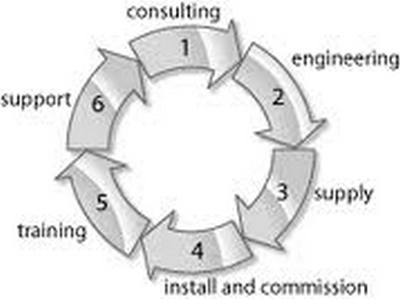
What does this mean? We look at your current set-up and offer solutions based around your requirements, current technology, trends and upcoming technology.
This takes place by a meeting which is a combination of site audit, brainstorming, demonstration, training, change management and solution planning. After the meeting a document is produced for the client that can be used as basis for I.C.T. (Information Communications Technology) decisions.
Cost to benefit
Ease of use – End user experience
Security
Backup
Reliability
Redundancy
Industry trends
Future growth planning
Multi-site planning
Emerging technologies
Reducing overlapping technology
Effective communications
Administrative controls
Accessibility
Proven track record of the technology
Trial of new technology
Change management
Staff training
Supply costs
Ongoing running costs
The client owns the Audit and Solution Engineering Report generated. The client may then use Area IT to implement the next stages or use a third party.
If Area I.T. is used for the next stages we can be used for the implementing the whole solution or part of the solution or we can play an overseer role (Project Manager).
This process greatly impacts the outcome in terms of reaching client’s goals, efficiency in doing so and cost reduction.
“A goal without a plan is just a wish.”
Antoine de Saint-Exupery